
WooCommerce FFL Plugin
Add compliant FFL dealer selection to your WordPress store's checkout. Customers search and select their preferred firearms dealer without leaving your site.
Plugin included free with CloudFFL API subscription
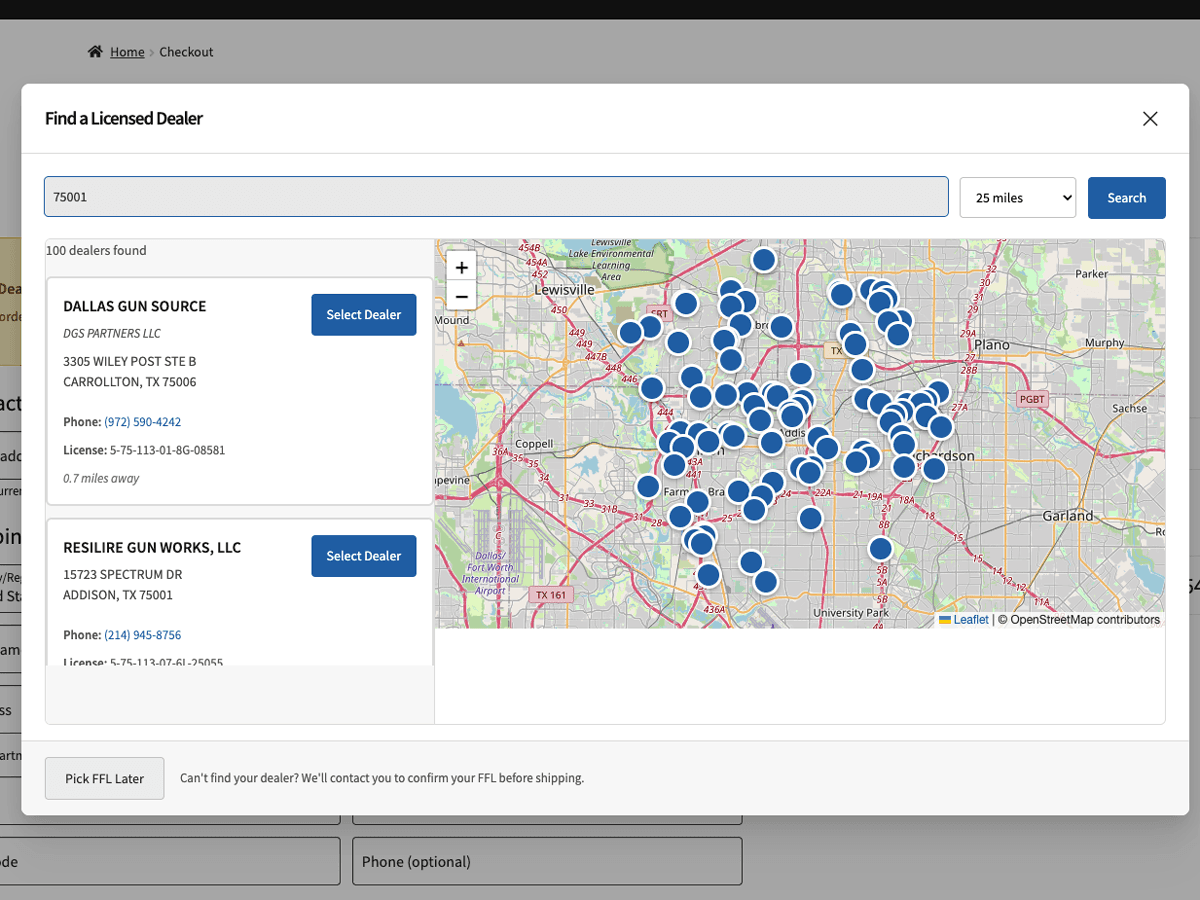
Everything You Need for FFL Checkout
A complete solution for firearms e-commerce on WordPress
Easy Installation
Install directly from WordPress admin. No coding required—just activate, enter your API key, and go.
WooCommerce Blocks Support
Works seamlessly with both classic checkout and the modern WooCommerce Blocks checkout experience.
Product-Level FFL Flags
Mark individual products or entire categories as requiring FFL transfer. Full control over what triggers the finder.
Proximity Search
Customers search by ZIP code, city, or dealer name. Results sorted by distance with map integration.
Order Integration
Selected FFL info automatically saved to orders. View dealer details right from WooCommerce order admin.
AmmoGate Compliance
Configure state-by-state ammo rules directly in WooCommerce. Automatically require FFL selection for ammunition in restricted states.
How It Works
Seamless FFL selection integrated into your checkout flow
Customer adds firearm to cart
Plugin detects FFL-required products and prepares checkout flow.
FFL finder appears at checkout
Customer searches for nearby dealers by ZIP code or location.
Customer selects their dealer
Choose from list or map view. Dealer info auto-fills shipping.
Order completes with FFL attached
FFL details saved to order for easy fulfillment and shipping.
Powerful Admin Features
Everything you need to manage FFL orders from WordPress
Mark products as FFL-required
Set FFL requirements by category
Simple configuration
AmmoGate State Compliance
Automatically enforce FFL transfer requirements for ammunition sales in restricted states. Configure everything directly in your WooCommerce admin—no separate dashboard needed.
- Configure restricted states in WooCommerce settings
- Set rules by product category or individual products
- Customers in restricted states prompted at checkout
- All 50 states configurable from plugin settings
Technical Requirements
| WordPress | 5.8 or higher |
| WooCommerce | 6.0 or higher |
| PHP | 7.4 or higher |
| CloudFFL API | $69/month subscription |
| HPOS Compatible | |
| Blocks Checkout |
Frequently Asked Questions
Does this work with WooCommerce Blocks checkout?
Yes! The plugin fully supports both the classic WooCommerce checkout and the modern Blocks-based checkout. The FFL finder integrates seamlessly with either experience.
Can customers checkout with mixed FFL and non-FFL items?
WooCommerce does not natively support split shipping to multiple addresses in a single order. For now, customers with mixed carts will need to complete separate orders—one for FFL items (shipped to their dealer) and one for accessories (shipped to their address). Split shipping integration may be added in a future update.
How does AmmoGate state compliance work?
Configure which states require FFL transfer for ammunition purchases directly in the plugin settings within WooCommerce. When a customer from a restricted state checks out with ammo, they'll be prompted to select an FFL—automatically.
What happens if a customer doesn't select an FFL?
The plugin prevents checkout completion until an FFL is selected for orders containing FFL-required items. Customers see a clear message explaining they need to choose a dealer.
Is the plugin compatible with HPOS (High-Performance Order Storage)?
Yes, the plugin is fully compatible with WooCommerce's High-Performance Order Storage feature for improved database performance.
Can I control which FFLs appear in search results?
Yes, the plugin includes filtering options in its settings. You can configure search radius, filter by license type, and customize the display to match your needs.
Ready to Add FFL Checkout to WooCommerce?
Get started with CloudFFL and download the WooCommerce plugin. Includes AmmoGate compliance at no extra cost.