
Odoo FFL Finder Module
Native Odoo module for compliant FFL dealer selection at checkout. Built for Odoo e-commerce with backend tools for your staff.
Module requires CloudFFL API subscription ($69/month)
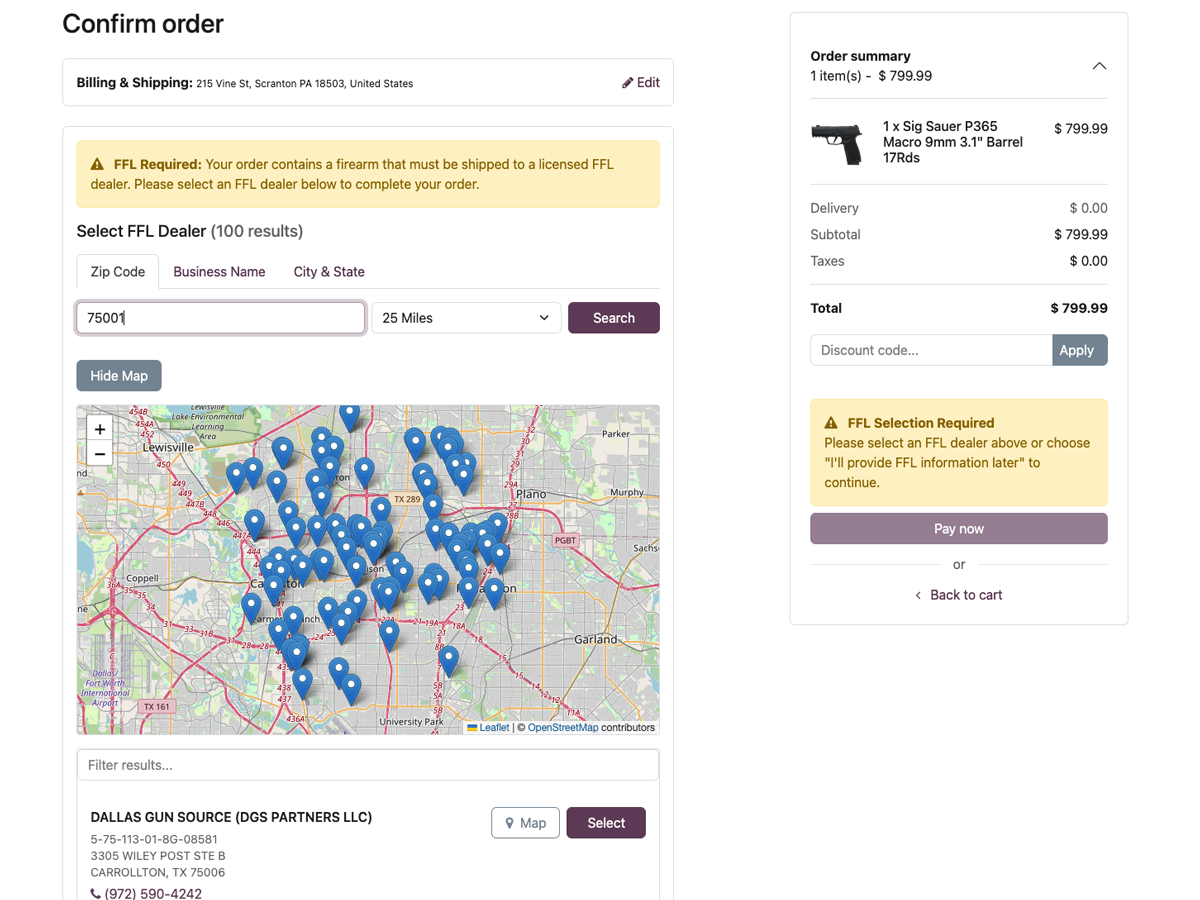
Built for Odoo E-commerce
A native module designed specifically for Odoo's architecture
Native Odoo Integration
Built specifically for Odoo 17, with versions 18 and 19 coming soon. Seamlessly integrates with Odoo e-commerce and workflows.
Multiple Search Methods
Search by ZIP code, city & state, or business name. Flexible options for every customer.
Backend Staff Wizard
Search and assign FFLs from the Odoo backend for phone orders. Your staff can find dealers without customer self-service.
Product-Level FFL Flags
Mark products or categories as requiring FFL transfer. Control exactly what triggers the FFL finder.
Age Gate Verification
Age verification at checkout with multiple display styles. Required by most payment processors for firearms e-commerce.
Advanced FFL Filtering
Filter by license type, exclude big box retailers, hide manufacturers—all configured in the CloudFFL API dashboard.
Ammo Gate Compliance
Configure state-by-state and category-based ammo rules directly in Odoo. Enforce FFL selection for restricted states automatically.
How It Works
Seamless FFL selection integrated into your Odoo checkout
Customer adds firearm to cart
Module detects FFL-required products and prepares checkout flow.
FFL finder appears at checkout
Customer searches for nearby dealers by ZIP, city & state, or business name.
Customer selects their dealer
Choose from search results. Dealer address auto-populates shipping.
Order completes with FFL attached
FFL details saved to sales order for fulfillment.
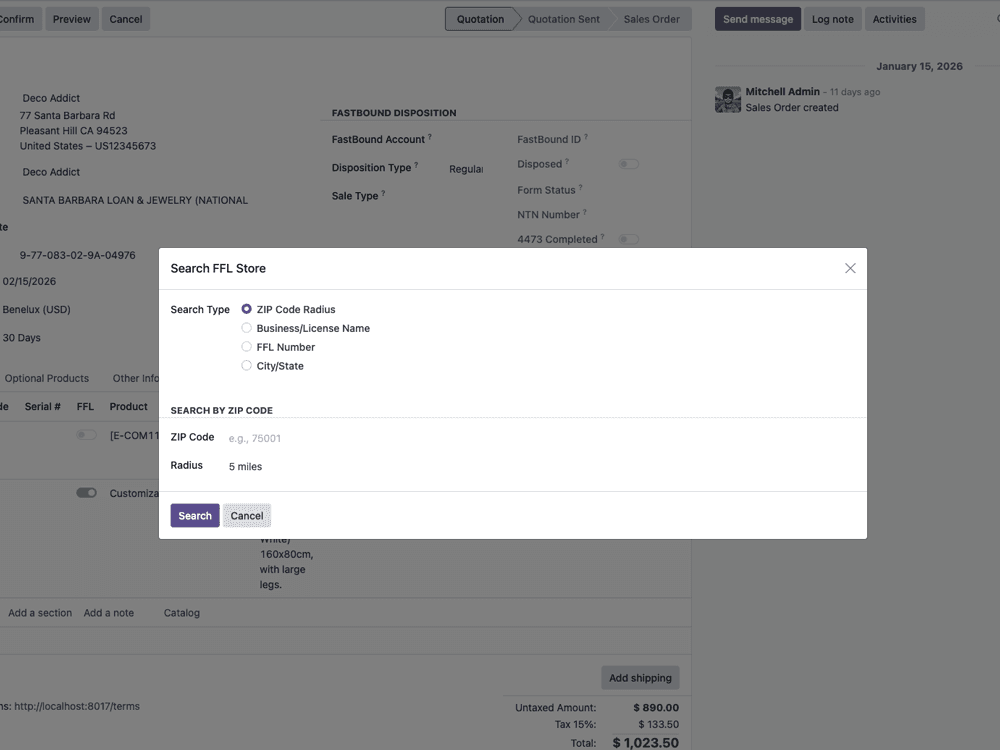
Staff FFL Search Wizard
Take phone orders with ease. Your staff can search for FFLs and assign them to sales orders directly from the Odoo backend—no customer self-service required.
- Search FFLs from any sales order
- Same powerful search as customer-facing
- Assign FFL in one click
- Perfect for call center operations
Powerful Filtering Options
Control exactly which FFLs appear in search results via the CloudFFL API dashboard
Filter by License Type
Show only dealers, pawnbrokers, gunsmiths, or specific license categories.
Exclude Big Box Retailers
Hide large chain stores if you prefer customers use local gun shops.
Hide Manufacturers/Importers
Remove manufacturer and importer licenses from customer search results.
Dealer Blacklist
Block specific FFLs you don't want to work with from appearing in results.
Web Category Rules
Set FFL requirements by Odoo product categories for granular control.
State-Based Enforcement
Require FFL selection for specific states with Ammo Gate restrictions.
All filtering options are configured in the CloudFFL API dashboard and apply automatically to your Odoo store.
Ammo Gate State Compliance
Automatically enforce FFL transfer requirements for ammunition sales based on customer state and product categories. Configure everything directly in the Odoo module settings.
- Configure restricted states in Odoo
- Set rules by web category
- Automatic checkout enforcement
- All 50 states configurable
- Included with the Odoo module
- Works with FFL filtering
Integrated with Odoo Backend
FFL information flows naturally through your Odoo workflows
Mark products as FFL-required
FFL info on sales orders
Simple API key configuration
Technical Requirements
| Odoo Version | 17.0 (18, 19 coming soon) |
| Required Modules | Website, E-commerce |
| Python | requests library (auto-installed) |
| CloudFFL API | $69/month subscription |
| Backend Wizard | |
| Age Gate | |
| Ammo Gate |
Frequently Asked Questions
Which Odoo versions are supported?
The module currently supports Odoo 17. Versions for Odoo 18 and 19 are coming soon. Each version is built natively for that Odoo release.
Does the module work with custom Odoo themes?
Yes, the FFL finder is designed to work with any Odoo e-commerce theme. It uses Odoo's standard styling conventions to match your store's look and feel.
Can my staff search for FFLs on phone orders?
Absolutely! The backend staff wizard lets your team search and assign FFLs directly from the Odoo backend when taking phone orders or managing sales orders.
How do I configure which FFLs appear in search results?
All filtering options are configured in the CloudFFL API dashboard. Set license type filters, exclusions, blacklists, and more—then your Odoo module automatically uses those settings.
How does Ammo Gate work with Odoo categories?
Configure which web categories and states require FFL transfer in the module settings. When a customer from a restricted state has ammo in their cart, the FFL finder automatically activates.
Is the FFL info included in order emails?
Yes, the selected FFL dealer information is saved to the sales order and can be included in order confirmation emails and packing slips.
Ready to Add FFL Checkout to Odoo?
Get the module from Odoo Apps and sign up for CloudFFL API access. Includes Ammo Gate compliance at no extra cost.